Photorealistic Render Prompt Formula for Nano Banana
Still re-rolling AI renders and hoping for a lucky hit? Your model screenshot looks clean, but the output always feels one step short. Today we break down a universal photorealistic render prompt formula—whether you use Nano Banana, Midjourney, or Stable Diffusion, you can consistently get real-photo results that look like top-tier hotel marketing.
Why your AI renders keep missing the mark
Many designers face the same trap: drop a SketchUp or 3D model screenshot into AI, write a long paragraph, and get warped angles, wrong materials, or a mood that misses entirely. The root cause is unstructured prompts without professional photography logic.
AI is not mind-reading. You need to direct it like a photographer: lens choice, light, season, emotion. The formula below is built on real architectural and landscape photography logic. Even with an easy tool like Nano Banana, filling the brackets correctly delivers pro-level results fast.
Universal formula (copy, then replace the [brackets])
Convert this 3D model screenshot into a real photo shot by a top architectural and landscape photographer, using professional lens settings and shooting technique; the overall mood should feel like a global [luxury hotel] landscape;

Generate the photo according to the original screenshot’s scale, object placement, and landscape design. Do not change the camera angle, size, proportions, or design elements;

Scene requirements:
1. Weather: [weather]; lighting mood: [lighting effect];
2. Season: [season]; time of day: [time];
3. Camera angle: [shooting angle];
4. Atmosphere: [overall scene atmosphere description];
5. Scene details: [scene detail description];
6. Camera gear and image character: [camera and texture description];
7. Realism enhancement: [material detail requirements].
Core logic of the formula
Anchor first: Treat the model screenshot as a locked layout. AI only enhances rendering—no reframing. This fixes warped perspectives.
Layered control: Move from macro (weather / season / time) to micro (materials / gear) so the model does not freestyle.
Atmosphere wins: Item 4 is the most critical. Use concrete imagery—e.g. “quiet dusk light on an infinity pool, layered mountains in the distance, coconut palms swaying nearby”—not vague words like “nice” or “premium.”
Practical tips: how to fill the [brackets]
Not fluent in photography jargon? Use this foolproof workflow:
- Upload your model screenshot to GPT (or Doubao or any mainstream chat AI).
- Paste this instruction along with the formula above:
I need to turn the uploaded model screenshot into a photorealistic scene with Nano Banana. Write a complete prompt for me, enrich scene details and mood, follow my format exactly, and replace every [bracket] based on what you see in the image. Format: (paste the universal formula)The assistant will output a fully structured prompt—weather, light, season, angle, atmosphere, camera model, material notes—automatically.
You do not need to know depth of field or golden hour by heart. Paste the result into Nano Banana image-to-image and stability jumps immediately.
Advanced: when to use items 5, 6, and 7
Item 5 (scene details): Use when signature structures, water features, paving, or planting must read clearly.
Item 6 (camera gear): Specify Hasselblad medium-format richness or Sony mirrorless crispness if you want a particular look; otherwise omit.
Item 7 (material boost): Phrases like “stronger glass reflections” or “subtle stone surface micro-texture” push realism one level up.
For daily speed runs, items 1–4 plus the layout lock already score 80+. For bids or client decks, use all seven. In tests, Nano Banana with the full seven-item prompt can rival dedicated render engines.
Before and after: model screenshot to hotel-grade reality
Someone used this formula with Nano Banana on a resort pool scene:
- Input: Clay model screenshot—no materials, no lighting.
- Prompt: “Summer evening, golden sunset, low-angle shot, sparkling water, dappled tropical plant shadows, Canon 5D Mark IV with 24–70mm lens, enhanced pool mosaic texture.”
- Output: Brochure-ready photography—rich light, believable materials, strong mood, and the exact same camera angle as the model. No crop fixes.
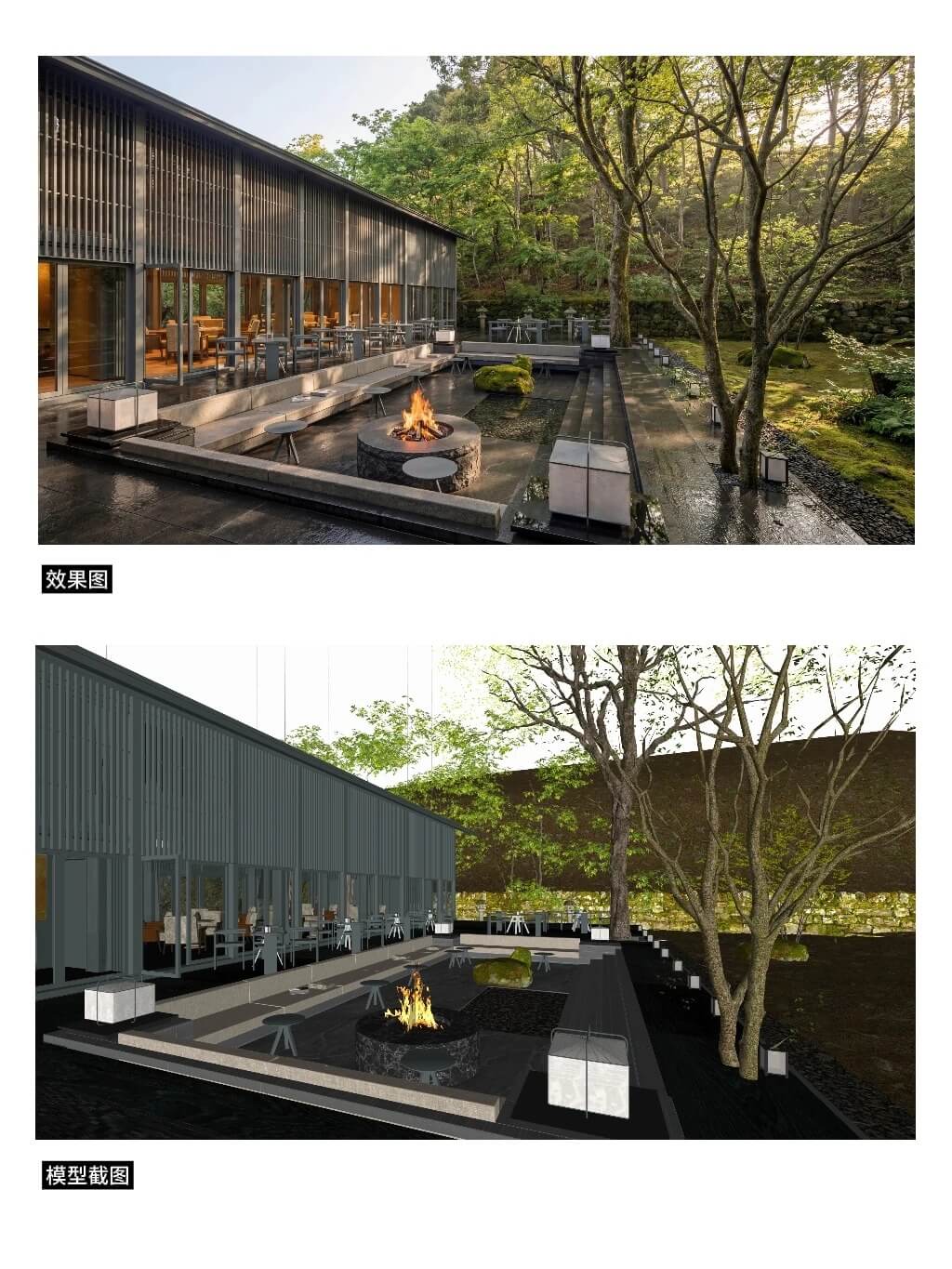
No re-rolling. One structured pass. That is the efficiency of Nano Banana plus a locked prompt workflow.
Conclusion: make AI your staff photographer
This formula is a standardized pipeline. It turns fuzzy “beauty” into measurable parameters, then lets AI reproduce photographer-grade work. Architects, landscape designers, and interior visualization pros can all ship faster with Nano Banana.
Next time you open an AI tool, fill all seven brackets first—then watch “gambling” disappear.
FAQ
Q: Is this formula only for Nano Banana?
A: The structure works across Midjourney, Stable Diffusion, and similar tools. We focus on Nano Banana because its image-to-image workflow anchors composition and materials reliably in practice.
Q: Why insist on “do not change the camera angle”?
A: Your screenshot already locks layout and proportion. That constraint stops AI from reframing buildings or shifting landscape elements—the main reason people re-roll endlessly.
Q: Must I always use all seven items?
A: No. Quick drafts: items 1–4 plus the layout lock. Pitches and marketing: use all seven for higher material and tonal ceilings.