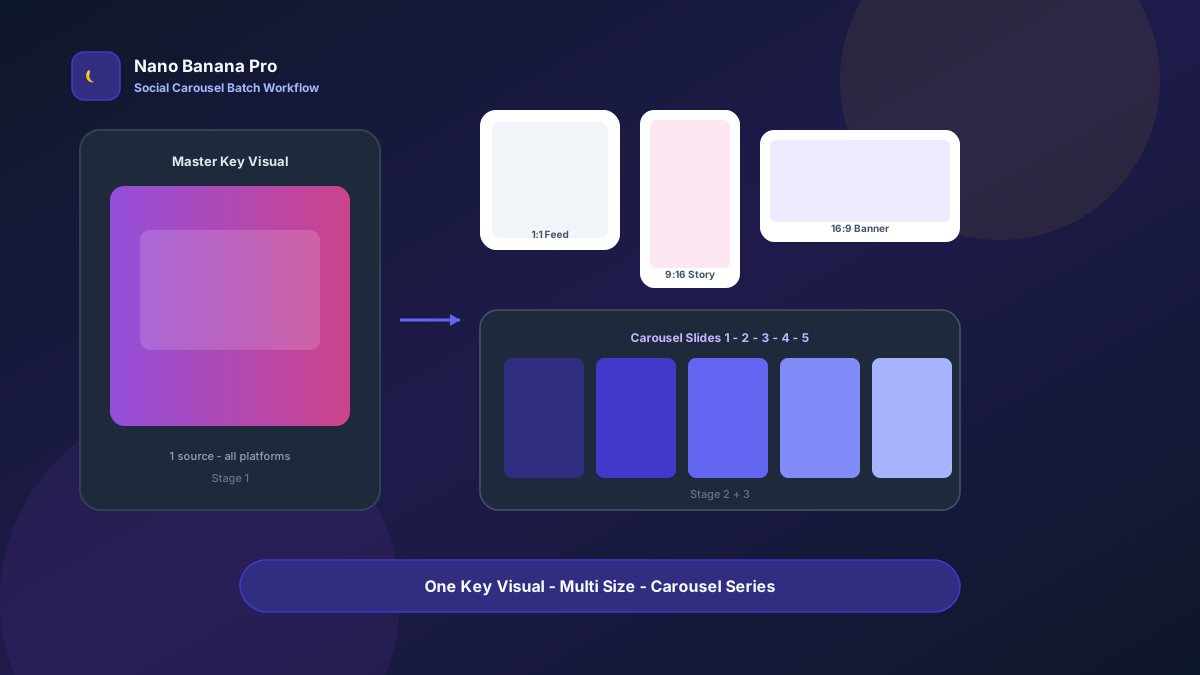
Nano Banana Pro Social Media Carousel Batch Workflow
Every social team knows this breakdown: after the campaign hero is approved, design must deliver Instagram square, Story vertical, X horizontal, LinkedIn cover—and a 5-slide educational carousel, each with reworked layout, font sizes, and safe zones, pushing the schedule into next week. Nano Banana Pro paired with Nano Banana image-to-image turns “one master KV + three template prompts” into a repeatable social media carousel batch adaptation workflow: lock the hero first, then batch-extend sizes and carousel sequences. This article covers it end to end.
Why Social Teams Need a “Hero-First” Batch SOP
The pain of multi-platform output is not “we can’t design”—it is recomposing the same campaign for every aspect ratio: 1:1 needs bigger headlines, 9:16 needs bottom CTA safe zones, 16:9 needs compressed information hierarchy. Writing prompts from scratch each time lets brand colors, font tone, and product placement drift.
Nano Banana Pro builds on the fast generation of Nano Banana and is better suited for commercial social use cases that need stable composition anchors, readable text, and consistent brand colors. Split the flow into three steps—Master KV → multi-size crop extension → carousel storyboard—and you can batch produce like an assembly line instead of re-rolling every platform separately.
Workflow Overview: One KV, Three Output Types
Run strictly in order: after the hero is signed off, use it as the reference for all extensions to avoid carousel and single-image style splits.
| Stage | Output Type | Typical Use | Core Constraints |
|---|---|---|---|
| 1 | Master KV (4:5 or 1:1) | Campaign core creative, internal alignment | Fixed logo/product placement, accurate brand colors |
| 2 | Multi-platform size pack | Feed / Story / horizontal banner | Keep subject unchanged; adapt ratio and safe zones only |
| 3 | Carousel sequence 3–7 slides | Instagram swipe posts, LinkedIn document style | Unified visual system, one message point per slide |
Stage 1: Master KV (Single Source of Truth for the Campaign)
Use for: product launches, feature releases, major promotions, brand collabs—any scenario that needs “one image to tell the story”.
Key steps
- Prepare brand color values, logo PNG, product or UI screenshots (if any).
- Generate 4:5 or 1:1 hero via text-to-image or image-to-image as reference for all extensions.
- Before export, check: headline readable, logo not edge-clipped, enough Story crop margin (10% top and bottom).
Generate a social media campaign hero poster, 4:5 ratio, theme [Campaign theme, e.g. Nano Banana Pro new feature launch];

Brand requirements: primary color [brand primary HEX], secondary [secondary HEX], style [minimal tech / vibrant youth / premium business], must include clearly readable main headline "[Main headline copy]" and subheadline "[Subheadline]";

Center frame: [product screenshot / 3D mockup / abstract graphic], background [gradient / scene], no cluttered elements, reserve top 12% and bottom 15% safe zones for later Story cropping;

Quality: social ad grade, high contrast, suitable for Instagram and LinkedIn ads, overall tone consistent with Nano Banana brand.
Pro tip: Do not overload text in the hero stage—put educational carousel copy in Stage 3 slide by slide. In practice with Nano Banana Pro, once the hero is locked, size extension pass rates can exceed 80%.
Stage 2: Multi-Platform Size Batch Extension
After the hero is locked, use image-to-image to batch-generate platform specs without recomposing from scratch.
Based on the uploaded hero poster, adapt to [target ratio: 1:1 / 9:16 / 16:9] social media version;

Strict requirements: preserve main headline "[Main headline]", logo, core product/graphic placement and proportions, do not change brand colors or overall composition logic—only adjust crop and whitespace for target ratio;

[9:16 only] Place CTA button or key info in lower-middle safe zone, top 10% clear to avoid UI overlap;
[16:9 only] Compress background decoration, strengthen left headline zone and right product zone;
[1:1 only] Center composition, headline slightly enlarged;

Output ready for direct use on [Instagram Feed / Instagram Story / X post / LinkedIn single image].
Nano Banana multi-turn dialogue works well for micro-adjustments: “move Story headline up 5%” or “soften background particles on horizontal version”—more efficient than rewriting the full prompt.
Stage 3: Carousel Sequence Storyboard Template
Carousel posts succeed when each slide carries one message point and the visual system matches the Master KV. Recommended fixed 5-slide structure:
- Cover: main headline + pain hook
- Problem & Solution: user scenario resonance / product or feature highlights
- Evidence & CTA: data, comparison, screenshots / call to action + brand
Generate Instagram carousel slide [slide number] of 5, unified visual system: primary [HEX], font style consistent with uploaded hero;

This slide theme: [slide message point, e.g. slide 3: Nano Banana Pro one-click multi-size export];
Slide copy (must be clearly readable): "[Slide title]" body points: "[2–3 line bullet points]";

Composition: 4:5 vertical, left text zone / right illustration zone (or top-bottom split), background continues hero gradient, do not introduce new decorative styles;
Optional slide indicator "[1/5]", keep series continuity, suitable for **Nano Banana Pro** batch generation then sequential upload.
Brand Consistency: Avoid “Five Different Campaigns” Across Platforms
The most common batch social failure is style drift. When running series campaigns with Nano Banana Pro, lock these:
- Same Master KV as reference: all sizes and carousel slides image-to-image from the same source file
- Fixed color values and font descriptions: repeat in every prompt “primary #XXXXXX, bold sans-serif headline”
- Fixed suffix line: “consistent with Nano Banana brand social standards: high contrast, readable text, no excessive effects”
If your team has a mood board, upload it to Nano Banana image-to-image first, then instruct “replace copy and slide numbers only, keep lighting and palette”.
Batch Execution Checklist (Campaign Launch Countdown)
Count backward from launch day:
| Day | Task | Tool |
|---|---|---|
| D-5 | Align campaign copy and brand colors; lock main headline | Docs |
| D-4 | Generate Master KV (Template 1), internal review and sign-off | Nano Banana Pro |
| D-3 | Batch extend 1:1 / 9:16 / 16:9 (Template 2) | Nano Banana Pro |
| D-2 | Generate 5-slide carousel sequence (Template 3), copy proofread | Nano Banana |
| D-1 | Export, compress, upload to platform backends; Story link stickers | Platform backend |
| D-0 | Scheduled publish + first-comment guidance; monitor CTR | Ops |
Efficiency benchmark: once fluent, one campaign with 1 hero + 3 sizes + 5 carousel slides takes about 8–12 generations (including tweaks)—first draft within one business day. During peak promo with 3 parallel campaigns, the Nano Banana Pro batch workflow can significantly compress design scheduling.
Case Study: SaaS Feature Launch From KV to Full Platform Pack
An AI tool team needed to announce a “batch export” feature with tight design resources—Instagram carousel + Story + LinkedIn horizontal within 2 days.
- Input: Product UI screenshot + brand purple gradient guidelines
- Step 1: Stage 1 template for 4:5 Master KV, headline “Export Every Size in One Click”
- Step 2: Extend 1:1 Feed, 9:16 Story, 1200×628 LinkedIn horizontal—one each
- Step 3: Generate 5-slide carousel: pain point → old workflow → new feature → comparison data → CTA
- Output: 9 upload-ready assets, entire pipeline in Nano Banana
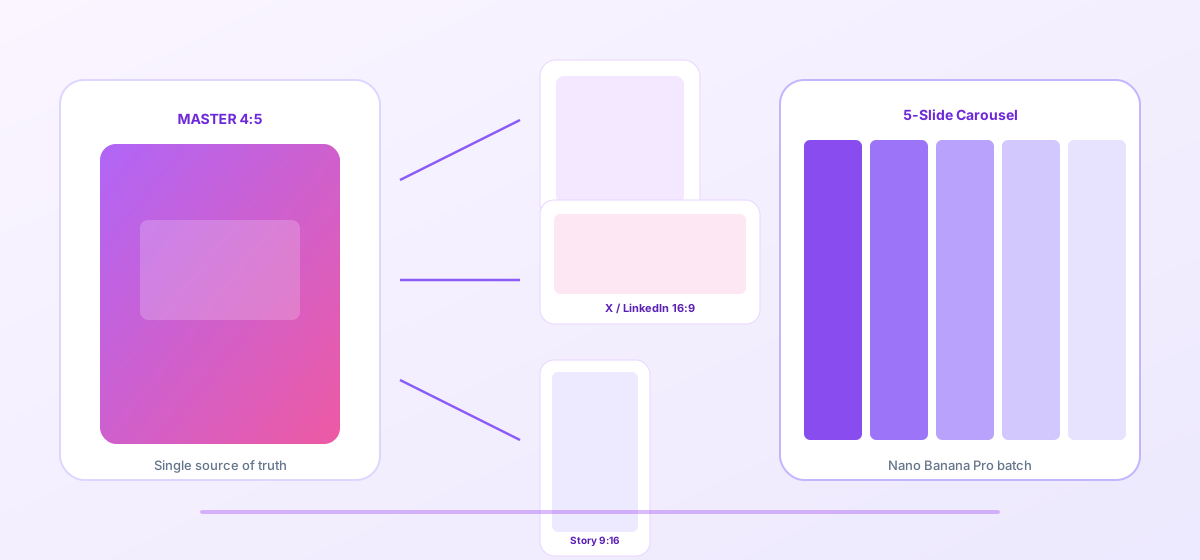
Team feedback: Story completion rate 24% higher than single-image posts, carousel swipe rate improved noticeably; production time under one-fifth of outsourced design quotes. Structured prompts plus stable Nano Banana Pro image-to-image let social teams focus on copy and media buying instead of repetitive cropping.
Conclusion: Save Creativity for Strategy, Sizes for the Workflow
Social competition is ultimately about frequency and consistency. When visual production shifts from “build separately per platform” to “hero + template extension”, ops can focus on A/B testing and conversion optimization. Nano Banana Pro and Nano Banana fit as the execution engine for this social SOP—not replacing brand taste, but making one campaign visual scalable.
After your next campaign hero is approved, create the Master KV first, then open the three templates—you will find multi-platform carousels in Nano Banana as clear and controllable as a content calendar.
FAQ
Q: Carousel text looks blurry—what do I do?
A: Emphasize in the prompt “headline must be clearly readable, high contrast, no decorative fonts”, and generate slide by slide instead of all 5 at once. Nano Banana Pro supports readable text better than random text-to-image output—run each slide separately and proofread manually.
Q: Story safe zones differ by platform—how to stay compatible?
A: Reserve 10–15% top and bottom whitespace in the hero stage; in Story extension prompt specify “keep key info away from top 15% and bottom 20%”. Spot-check with each platform preview tool before go-live.
Q: How do Nano Banana and Nano Banana Pro divide work?
A: Nano Banana Pro handles Master KV and high-quality size extension; Nano Banana handles carousel multi-turn tweaks and quick color trials. Templates are shared—choose the entry by account access.